
Cafés live and die by the morning rush. Getting EPOS for cafes, coffee shops and takeaways right means a till that’s quick, small enough for a crowded counter and tough enough to survive the odd flat white spilled across it. Here’s what we recommend to the resellers who look after these sites every day.
Cafés, coffee shops and takeaways have very different EPOS needs from a large restaurant or supermarket. Counters are small, queues build quickly and the menu changes often. The right EPOS hardware keeps service fast and tidy; the wrong hardware clutters the counter and slows staff down. Use this checklist to plan an EPOS system that fits the way a café or takeaway really works.
1. EPOS for cafes starts with a compact, spill-resistant till
Counter space is precious. An all-in-one EPOS terminal puts the screen and computer in one unit with neat cable management underneath, leaving room for cups, card terminals and cake displays. Look for a sealed design that resists spills, steam and crumbs. HiStone all-in-one terminals such as the HK566Q and HK526Q are popular choices for compact counters.
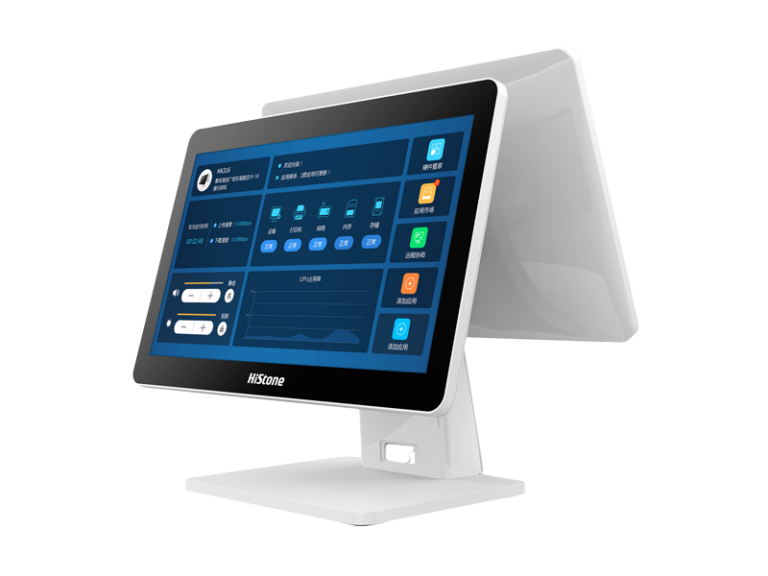
2. A customer display
A second screen facing the customer shows the order and total as it’s entered. It reduces mistakes, speeds up payment and can display offers or loyalty messages while customers wait.
3. Mobile EPOS for queue busting and table service
At peak times, a mobile EPOS device lets a second member of staff take orders down the queue or at the table, sending them straight to the kitchen or barista. HiStone mobile EPOS units such as the HM638N and HM336 are built for all-day handheld use and charge on a dock when not in use.
4. Kitchen printers or a kitchen display
Orders need to reach the kitchen or coffee machine instantly. A kitchen printer is simple and familiar, while a kitchen display system replaces paper tickets with a screen that tracks order times and bumps completed items. Kitchen displays are especially useful for takeaways juggling counter, phone and delivery-app orders.
5. A self-service ordering kiosk
For busy takeaways and grab-and-go cafés, a self-service kiosk lets customers browse the menu, customise their order and pay without queuing at the till. Staff are freed to focus on preparing food and drink. Countertop or wall-mounted kiosks suit smaller premises where floor space is tight.
6. Receipt printer and cash drawer
Even with card payments dominating, most cafés still need a fast receipt printer and a secure cash drawer. Choose models your EPOS software supports and position them so staff don’t have to reach across the customer.
7. Reliable software that suits food and drink
Café and takeaway EPOS software should handle modifiers (milk, size, extra shot), meal deals, eat-in and takeaway pricing, loyalty and integrations with delivery platforms. Choose your software first, then confirm the hardware is supported. ICRTouch is widely used in UK hospitality, and HiStone hardware is accredited for use with ICRTouch software.
Android or Windows/Linux for a café?
Many single-site cafés choose Android for its simplicity and lower start-up cost. Multi-site coffee chains, and businesses that need specialist software or integrations, often prefer Windows/Linux. Read our guide to Android vs Windows/Linux EPOS for a full comparison.
Café and takeaway EPOS checklist
- Compact all-in-one terminal with spill-resistant design
- Customer-facing display
- Mobile EPOS device for queue busting or table service
- Kitchen printer or kitchen display system
- Self-service kiosk for busy periods
- Receipt printer and cash drawer
- Hospitality EPOS software with modifiers and delivery integrations
- A reseller who can install, train and support you
Frequently asked questions
How many tills does a small café need?
Most small cafés need one fixed till plus a mobile device for busy periods. Larger coffee shops often add a second fixed till or a kiosk.
Can a takeaway use a kiosk instead of a till?
A kiosk works alongside a till rather than replacing it. Customers who prefer to order in person, phone orders and refunds still need a staffed terminal.
Where can I see HiStone café EPOS hardware?
You can see HiStone terminals, mobile EPOS and kiosks in our Leicester showroom, or explore our hospitality EPOS systems. For a recommendation, request a quote or call 0116 260 3100.